TrackMinder vs spreadsheets for renewal tracking.
Spreadsheets can store renewal dates, costs, and notes, but they still rely on manual updates, manual review, and manual follow-up. TrackMinder is built specifically for subscriptions, contracts, bills, categories, reminders, and recurring renewals.
Spreadsheets are flexible, but renewal tracking needs more than rows and columns.
A spreadsheet can help you start tracking renewals, but it does not automatically create a renewal workflow. You still need to remember to update it, check it, organize it, and act on it.
Manual updates pile up
Every renewal date, cost change, status update, and category change depends on manual upkeep.
Reminders are not built in
You still need another system to remind you before renewal dates become urgent.
Review context gets scattered
Costs, categories, renewal notes, email reminders, and action decisions often drift apart.
Spreadsheets store renewal data. TrackMinder helps you manage renewal actions.
The real difference is whether your system only stores the renewal date, or also helps you review and act before the date arrives.
| Need | Spreadsheets | TrackMinder |
|---|---|---|
| Dedicated renewal dashboard | Limited unless manually built and maintained | Included for upcoming and urgent renewals |
| Recurring reminder rules | Requires manual formulas, notes, or external tools | Built for renewal and reminder workflows |
| Categories | Possible, but often inconsistent over time | Structured category-based organization |
| Email reminders | Depends on external automation or manual calendar setup | Designed to support reminder notifications |
| Renewal review workflow | Easy to ignore unless you check the spreadsheet often | Focused on reviewing before renewal dates arrive |
| Cost visibility | Requires manual columns and updates | Keep costs linked to tracked renewals |
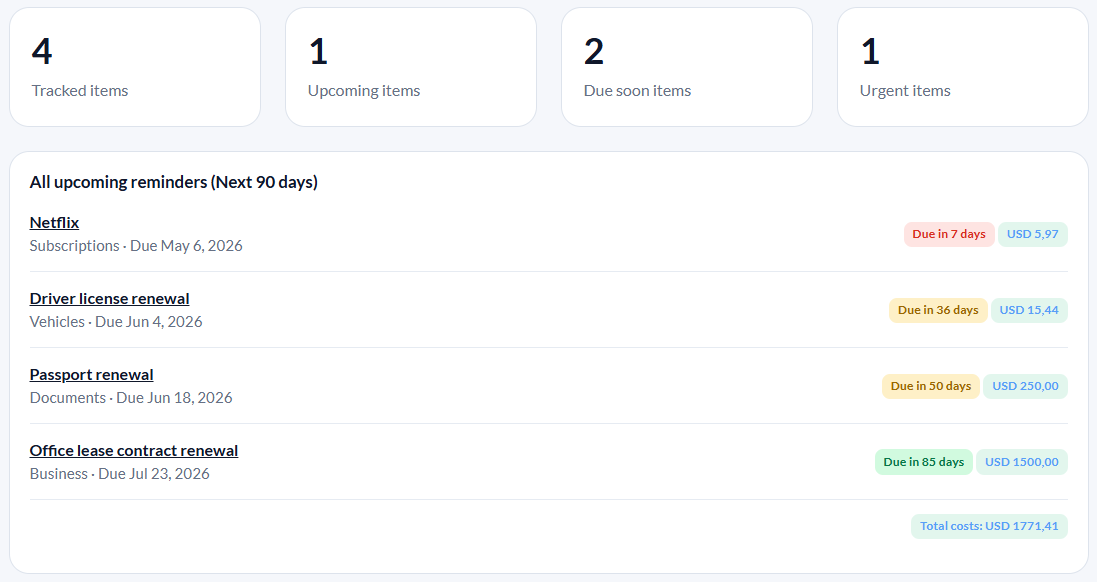
Move from spreadsheet upkeep to renewal visibility.
TrackMinder gives you a focused dashboard for upcoming renewals, due-soon items, urgent reminders, costs, categories, and recurring dates — without rebuilding a renewal system inside a spreadsheet.
Stop maintaining a renewal spreadsheet by hand.
Track subscriptions, contracts, bills, documents, policies, costs, categories, and recurring reminders from one focused dashboard.